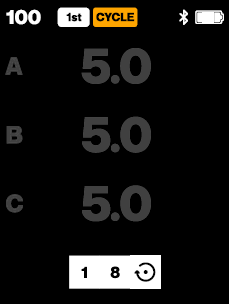
Cycle mode allows you to create and automatically step through multiple lighting setups (scenes). A scene stores the settings for each group (A-F), including flash power, flash ON/OFF state, and continuous light ON/OFF state.
You can define up to 8 scenes and switch between them during shooting.
When to use Cycle mode
Use Cycle mode when you want to:
• Alternate between different lighting setups across consecutive shots.
• Capture multiple lighting variations without manually adjusting settings.
How Cycle mode works
Cycle mode operates in two modes:
• PAUSE – The current scene remains active. You can adjust settings, and changes are saved automatically to that scene.
• LOOP – The Connect Pro automatically advances to the next scene on each camera sync or when pressing the Test button.
NOTE
For optimal flash compatibility, a maximum camera shooting rate of 15 fps is recommended when using Cycle mode. Higher frame rates may result in skipped steps or inconsistent triggering.
User controls
• Press the Auto button [8] to open the Cycle settings.
• Press Group button 4 [4] to cycle between Cycle settings.
• Turn the Main dial [6] to adjust the selected setting.
Settings
Current step (1-8):
Defines which scene is currently active. Each step represents one saved scene. Factory setting is 1.
Total steps (1-8):
Defines how many scenes are included in the cycle. Factory setting is 4.
Mode:
Select how the scenes are used:
• PAUSE – Allows editing of the current scene.
• LOOP – Automatically cycles through scenes on each camera sync or Test button press.
Working with steps
• Each step stores its own group settings (e.g., flash power and head ON/OFF state).
• Changes made in PAUSE mode are automatically saved to the current step.
• New steps inherit settings from the previous state:
− If a previous step has been configured, the next step inherits those settings.
− If no steps have been configured, the current device settings (before enabling Cycle mode) are used.
Advanced mode interaction and limitations
• Cycle mode and Multi pop mode are mutually exclusive.
• When either mode is enabled:
− AUTO (TTL) flash control is disabled.
− The Auto button is reassigned to control the active mode.
− An orange CYCLE or MULTI badge is shown in the top bar, replacing the AUTO indicator.
Was this article helpful?
That’s Great!
Thank you for your feedback
Sorry! We couldn't be helpful
Thank you for your feedback
Feedback sent
We appreciate your effort and will try to fix the article