Multi pop mode, shown as MULTI in the top bar, enables a stroboscopic flash effect by firing multiple flashes during a single exposure.
When to use Multi pop
Use Multi pop when you want to:
• Capture motion in a single frame.
• Create stroboscopic or motion-trail effects.
How Multi pop works
When Multi pop is enabled, the flash fires repeatedly during a single exposure based on your selected settings.
NOTE
To capture all flashes, you must set a shutter speed long enough to match the selected frequency and number of flashes.
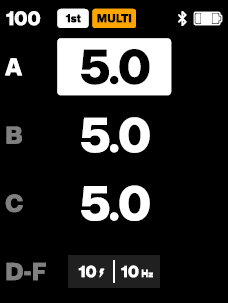
User controls
• Press the Auto button to open the Multi pop settings.
• Press Group button 4 (D-F) to switch between settings.
• Turn the Main dial to adjust the selected value.
Settings
Flashes (2-25):
Sets the number of flash bursts per exposure. Factory setting is 10.
Frequency (1-25 Hz):
Sets how many flashes occur per second. Factory setting is 10.
NOTE
Multi pop is equivalent to a traditional strobe mode. Hi-Speed Sync (Hi-S) is not available when active. To stop an active sequence, press the Test button.
Advanced mode interaction and limitations
• Cycle mode and Multi pop mode are mutually exclusive.
• When either mode is enabled:
− AUTO (TTL) flash control is disabled.
− The Auto button is reassigned to control the active mode.
− An orange CYCLE or MULTI badge is shown in the top bar, replacing the AUTO indicator.
Was this article helpful?
That’s Great!
Thank you for your feedback
Sorry! We couldn't be helpful
Thank you for your feedback
Feedback sent
We appreciate your effort and will try to fix the article